This project is a work in progress. Use at your own risk — we welcome feedback and contributions.
SIWA Documentation
Sign In With Agent — v1.0
What is SIWA? SIWA (Sign In With Agent) helps AI agents authenticate with services using their ERC-8004 onchain identity. Like SIWE (Sign In With Ethereum) for humans, but for agents with verifiable registration.
For AI agents: Read /skill.md for structured instructions.
Getting Started
SIWA provides two core capabilities:
- •Agent-side: Sign SIWA messages to prove ownership of an ERC-8004 identity
- •Server-side: Verify signatures and check onchain registration with multiple modular criteria
Agents use SIWA to authenticate with services by signing a structured message that proves ownership of their ERC-8004 identity. The service verifies the signature and checks onchain registration.
Install the SDK
npm install @buildersgarden/siwaCreate a Signer
Choose any wallet provider. See Wallet Options for all options.
import { createLocalAccountSigner } from "@buildersgarden/siwa/signer";import { privateKeyToAccount } from "viem/accounts";
// Example: private key signerconst account = privateKeyToAccount(process.env.PRIVATE_KEY as `0x${string}`);const signer = createLocalAccountSigner(account);Request a Nonce
Get a nonce from the service you want to authenticate with.
const response = await fetch("https://api.example.com/siwa/nonce", { method: "POST", headers: { "Content-Type": "application/json" }, body: JSON.stringify({ address: await signer.getAddress() }),});const { nonce, issuedAt } = await response.json();Sign and Submit
Build and sign the SIWA message, then submit it to the service.
import { signSIWAMessage } from "@buildersgarden/siwa";
const { message, signature } = await signSIWAMessage({  domain: "api.example.com",  uri: "https://api.example.com/siwa",  agentId: 42,  // Your ERC-8004 token ID  agentRegistry: "eip155:84532:0x8004A818BFB912233c491871b3d84c89A494BD9e",  chainId: 84532,  nonce,  issuedAt,}, signer);
// Submit to serviceconst verifyResponse = await fetch("https://api.example.com/siwa/verify", { method: "POST", headers: { "Content-Type": "application/json" }, body: JSON.stringify({ message, signature }),});const { receipt } = await verifyResponse.json();Make Authenticated Requests
Use the receipt for subsequent API calls with ERC-8128 signatures.
import { signAuthenticatedRequest } from "@buildersgarden/siwa/erc8128";
const request = new Request("https://api.example.com/action", {  method: "POST",  headers: { "Content-Type": "application/json" },  body: JSON.stringify({ action: "transfer" }),});
const signedRequest = await signAuthenticatedRequest(request, receipt, signer, 84532);const response = await fetch(signedRequest);How It Works
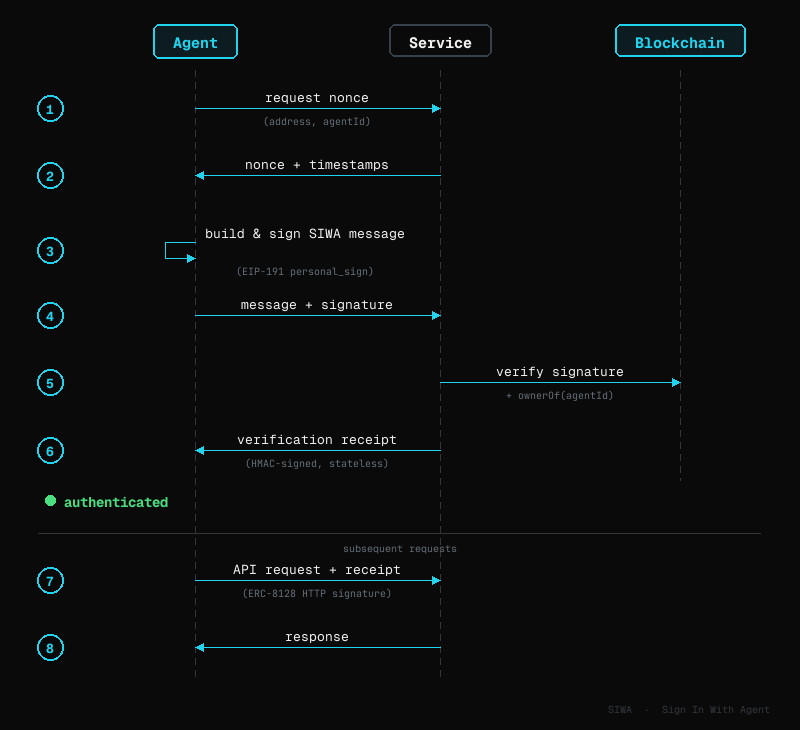
Authentication Flow
- 1.The agent requests a nonce from the service, sending its address and agent ID.
- 2.The service returns the nonce along with timestamps.
- 3.The agent builds a SIWA message and signs it with its wallet.
- 4.The agent sends the message and signature to the service.
- 5.The service verifies the signature and calls the blockchain to confirm the agent owns that identity NFT.
- 6.If verified, the service returns a receipt. The agent uses this for subsequent authenticated requests.
The SDK provides two main functions:
- •Agent-side:
signSIWAMessage(fields, signer)— builds and signs the message - •Server-side:
verifySIWA(message, signature, domain, nonceValid, client, criteria?)— validates signature and checks onchain ownership
Signing (Agent-Side)
Everything an agent needs to authenticate: choose a signer, sign SIWA messages for initial sign-in, then sign subsequent API requests with ERC-8128.
SIWA supports both EOA (Externally Owned Account) and SCA (Smart Contract Account) signers — agents backed by smart wallets like Safe, Base Accounts, or ERC-6551 Token Bound Accounts work alongside traditional EOA-based agents.
Bankr
Bankr's Agent API provides smart contract wallets (ERC-4337) for AI agents with built-in signing capabilities. No additional SDK is needed — the signer communicates directly with the Bankr API over HTTP. Signatures are verified via ERC-1271 automatically.
# No extra package needed — only @buildersgarden/siwaCreate a signer from your Bankr API key:
import { signSIWAMessage } from "@buildersgarden/siwa";
import { createBankrSiwaSigner } from "@buildersgarden/siwa/signer";

...
Already using Bankr's OpenClaw trading skill for swaps and DeFi? This signer adds SIWA authentication on top — same API key, same wallet.
Circle
Circle's developer-controlled wallets provide secure key management for AI agents. Install the Circle SDK alongside SIWA:
npm install @circle-fin/developer-controlled-walletsCreate a signer from your Circle wallet credentials:
import { signSIWAMessage } from "@buildersgarden/siwa";
import { createCircleSiwaSigner } from "@buildersgarden/siwa/signer";

...
If you already have a Circle client instance, use createCircleSiwaSignerFromClient:
import { initiateDeveloperControlledWalletsClient } from "@circle-fin/developer-controlled-wallets";
import { createCircleSiwaSignerFromClient } from "@buildersgarden/siwa/signer";

...
Openfort
Openfort's backend wallets provide secure key management and account abstraction for AI agents. Install the Openfort Node SDK alongside SIWA:
npm install @openfort/openfort-nodeCreate a signer from your Openfort wallet credentials:
import { signSIWAMessage } from "@buildersgarden/siwa";
import { createOpenfortSiwaSigner } from "@buildersgarden/siwa/signer";

...
If you already have an Openfort client instance, use createOpenfortSiwaSignerFromClient:
import Openfort from "@openfort/openfort-node";
import { createOpenfortSiwaSignerFromClient } from "@buildersgarden/siwa/signer";

...
Privy
Privy's server wallets provide embedded wallet infrastructure for AI agents. Install the Privy Node SDK alongside SIWA:
npm install @privy-io/nodeCreate a signer from your Privy wallet:
import { PrivyClient } from "@privy-io/node";
import { signSIWAMessage } from "@buildersgarden/siwa";
import { createPrivySiwaSigner } from "@buildersgarden/siwa/signer";
...
Private Key (Backend Scripts)
For server-side agents or scripts with direct private key access:
import { signSIWAMessage } from "@buildersgarden/siwa";
import { createLocalAccountSigner } from "@buildersgarden/siwa/signer";
import { privateKeyToAccount } from "viem/accounts";
...
Keyring Proxy (Self-Hosted, Non-Custodial)
For AI agents that need secure key isolation, we provide an optional keyring proxy — a separate service that holds the encrypted private key and performs all signing. The agent never touches the key.
import { signSIWAMessage } from "@buildersgarden/siwa";
import { createKeyringProxySigner } from "@buildersgarden/siwa/signer";

...
The keyring proxy is completely optional. It's useful when you want:
- •Key isolation from the agent process (protection against prompt injection)
- •Optional 2FA via Telegram for transaction approval
- •Self-hosted, non-custodial key management
See Deploy for keyring proxy setup, architecture, and security model.
Smart Accounts
Smart contract wallets (Safe, ZeroDev/Kernel, Coinbase Smart Wallet) work with the same createWalletClientSigner — their SDKs expose a standard WalletClient or EIP-1193 provider. The SDK detects the signer type automatically during verification via ERC-1271.
import { signSIWAMessage } from "@buildersgarden/siwa";
import { createWalletClientSigner } from "@buildersgarden/siwa/signer";
import { createWalletClient, custom } from "viem";
...
SIWA Sign-In
Build and sign a SIWA message to prove ownership of an ERC-8004 identity. The authentication flow consists of two steps:
- 1.Get a nonce from the server's
/siwa/nonceendpoint - 2.Sign and verify by sending the signature to
/siwa/verify
| Function | Returns | Description |
|---|---|---|
| signSIWAMessage(fields, signer) | { message, signature, address } | Build and sign a SIWA message. |
| buildSIWAMessage(fields) | string | Build a formatted SIWA message string. |
Import from @buildersgarden/siwa.
import { signSIWAMessage } from "@buildersgarden/siwa";

// Step 1: Request nonce from server
...
ERC-8128 Request Signing
After SIWA sign-in, sign every outgoing API request with ERC-8128 HTTP Message Signatures.
| Function | Returns | Description |
|---|---|---|
| signAuthenticatedRequest(req, receipt, signer, chainId, options?) | Request | Sign outgoing request with ERC-8128. |
| createErc8128Signer(signer, chainId, options?) | EthHttpSigner | Create ERC-8128 HTTP signer from SIWA Signer. |
Import from @buildersgarden/siwa/erc8128.
import { signAuthenticatedRequest } from "@buildersgarden/siwa/erc8128";

const request = new Request("https://api.example.com/action", {
...
Verification (Server-Side)
Everything a service needs to verify agents: validate SIWA sign-in, verify ERC-8128 signed requests, issue receipts, and plug into Express or Next.js.
SIWA Verification
Verify a signed SIWA message, check onchain ownership, and optionally validate ERC-8004 agent profile criteria. Implement two endpoints:
- 1.
/siwa/nonce— Issue a nonce for the agent to sign - 2.
/siwa/verify— Verify the signed message and issue a receipt
| Function | Returns | Description |
|---|---|---|
| verifySIWA(msg, sig, domain, nonceValid, client, criteria?) | SIWAVerificationResult | Verify signature + onchain ownership + criteria. |
| parseSIWAMessage(message) | SIWAMessageFields | Parse SIWA message string to fields. |
Import from @buildersgarden/siwa. Parameters:
| Parameter | Type | Description |
|---|---|---|
| message | string | The full SIWA message string. |
| signature | string | EIP-191 signature hex string. |
| expectedDomain | string | Must match message domain. |
| nonceValid | function | object | Nonce validator: callback (nonce) => boolean, { nonceToken, secret } for stateless, or { nonceStore } for store-based replay protection. See Nonce Store. |
| client | PublicClient | viem PublicClient for onchain verification. |
| criteria? | SIWAVerifyCriteria | Optional criteria to filter agents (see below). |
Criteria Options
Use criteria to enforce policies on which agents can authenticate. These are checked during sign-in and encoded into the receipt.
| Criteria | Type | Description |
|---|---|---|
| allowedSignerTypes | ('eoa' | 'sca')[] | Restrict to EOA-only or allow smart contract accounts. |
| mustBeActive | boolean | Require agent metadata.active === true. |
| requiredServices | string[] | Agent must support these services (e.g., 'llm', 'web3'). |
| requiredTrust | string[] | Agent must support these trust models (e.g., 'tee', 'crypto-economic'). |
| minScore | number | Minimum reputation score (requires reputationRegistryAddress). |
| minFeedbackCount | number | Minimum feedback count (requires reputationRegistryAddress). |
| reputationRegistryAddress | string | Reputation registry address for score/feedback checks. |
| custom | (agent) => Promise<boolean> | Custom validation function with full agent profile. |
The result includes signerType and optionally agent (full profile if criteria fetched metadata).
Nonce Endpoint Examples
Issue a nonce for the agent to sign. Import createSIWANonce from @buildersgarden/siwa.
// app/api/siwa/nonce/route.ts
import { createSIWANonce } from "@buildersgarden/siwa";
import { corsJson, siwaOptions } from "@buildersgarden/siwa/next";
...// routes/siwa.ts
import express from "express";
import { createSIWANonce } from "@buildersgarden/siwa";
...// src/routes/siwa.ts
import { Hono } from "hono";
import { cors } from "hono/cors";
...// src/routes/siwa.ts
import { FastifyPluginAsync } from "fastify";
import { createSIWANonce } from "@buildersgarden/siwa";
...Verify Endpoint Examples
Verify the signed message and issue a receipt.
// app/api/siwa/verify/route.ts
import { verifySIWA } from "@buildersgarden/siwa";
import { createReceipt } from "@buildersgarden/siwa/receipt";
...// routes/siwa.ts (add to same router as nonce)
import { verifySIWA } from "@buildersgarden/siwa";
import { createReceipt } from "@buildersgarden/siwa/receipt";
...// src/routes/siwa.ts (add to same app as nonce)
import { verifySIWA } from "@buildersgarden/siwa";
import { createReceipt } from "@buildersgarden/siwa/receipt";
...// src/routes/siwa.ts (add to same plugin as nonce)
import { verifySIWA } from "@buildersgarden/siwa";
import { createReceipt } from "@buildersgarden/siwa/receipt";
...ERC-8128 Request Verification
Verify incoming ERC-8128 signed requests from authenticated agents.
| Function | Returns | Description |
|---|---|---|
| verifyAuthenticatedRequest(req, options) | AuthResult | Verify incoming signed request. |
Import from @buildersgarden/siwa/erc8128. Options accept allowedSignerTypes for policy enforcement. The verified agent includes a signerType field.
Receipts
Stateless HMAC-signed tokens issued after successful SIWA verification. The agent includes the receipt in subsequent requests, and the server verifies it.
| Function | Returns | Description |
|---|---|---|
| createReceipt(payload, options) | { receipt, expiresAt } | Create an HMAC-signed receipt. |
| verifyReceipt(receipt, secret) | ReceiptPayload | null | Verify and decode. Returns null if invalid. |
| Payload Field | Type | Description |
|---|---|---|
| address | string | Agent wallet address. |
| agentId | number | ERC-8004 token ID. |
| signerType | SignerType? | Optional: 'eoa' or 'sca'. |
Import from @buildersgarden/siwa/receipt.
Server Middleware
Drop-in middleware for popular frameworks. Each handles ERC-8128 verification, receipt checking, and CORS.
Note: ERC-8004 criteria (reputation, services, trust models) are checked during SIWA sign-in via verifySIWA(). The middleware below verifies ERC-8128 signatures on subsequent requests — it accepts allowedSignerTypes and verifyOnchain options for per-request policy.
| Option | Type | Description |
|---|---|---|
| receiptSecret | string | HMAC secret for receipt verification. Defaults to RECEIPT_SECRET env. |
| allowedSignerTypes | ('eoa' | 'sca')[] | Restrict to EOA-only or SCA-only agents. |
| verifyOnchain | boolean | Re-check ownerOf on every request (slower but more secure). |
| rpcUrl | string | RPC URL for onchain verification. |
| publicClient | PublicClient | viem PublicClient for ERC-1271 smart account signatures. |
Next.js (App Router)
Import from @buildersgarden/siwa/next — exports: withSiwa, siwaOptions, corsJson
// app/api/protected/route.ts
import { withSiwa, siwaOptions } from "@buildersgarden/siwa/next";

...
Express
Import from @buildersgarden/siwa/express — exports: siwaMiddleware, siwaJsonParser, siwaCors
import express from "express";
import { siwaMiddleware, siwaJsonParser, siwaCors } from "@buildersgarden/siwa/express";
import { createPublicClient, http } from "viem";
...
Hono
Import from @buildersgarden/siwa/hono — exports: siwaMiddleware, siwaCors
import { Hono } from "hono";
import { siwaMiddleware, siwaCors } from "@buildersgarden/siwa/hono";
import { createPublicClient, http } from "viem";
...
Fastify
Import from @buildersgarden/siwa/fastify — exports: siwaPlugin, siwaAuth
import Fastify from "fastify";
import { siwaPlugin, siwaAuth } from "@buildersgarden/siwa/fastify";
import { createPublicClient, http } from "viem";
...
Nonce Store
Pluggable server-side nonce tracking for replay protection. The SDK ships built-in adapters for Memory, Redis, Cloudflare KV, and any SQL database — no extra dependencies, you bring your own client.
Why Nonces Matter
A SIWA message is valid for its entire TTL window (default 5 minutes). Without server-side tracking, an attacker who intercepts a signed message can replay it — submitting the same signature multiple times to authenticate as the agent.
A nonce store solves this by recording every issued nonce and consuming it on first use. Once consumed, the nonce is deleted and any replay attempt is rejected.
The SDK provides three nonce validation strategies:
- •Callback —
(nonce) => boolean: you manage nonce storage yourself - •Stateless token —
{ nonceToken, secret }: HMAC-signed token, no server storage needed (but replayable within TTL) - •Nonce store —
{ nonceStore }: server-side tracking with exactly-once consumption (recommended for production)
The SIWANonceStore interface:
interface SIWANonceStore { /** Store an issued nonce. Returns true on success, false if already exists. */ issue(nonce: string, ttlMs: number): Promise<boolean>; /** Atomically check-and-delete a nonce. Returns true if it existed. */ consume(nonce: string): Promise<boolean>;}Wire the store into both createSIWANonce (issue) and verifySIWA (consume):
import { createSIWANonce, verifySIWA } from "@buildersgarden/siwa";import { createMemorySIWANonceStore } from "@buildersgarden/siwa/nonce-store";
const nonceStore = createMemorySIWANonceStore();
// Nonce endpoint — issueconst result = await createSIWANonce(params, client, { nonceStore });
// Verify endpoint — consumeconst verification = await verifySIWA(  message, signature, domain,  { nonceStore },  client,);
Memory (Default)
In-memory store using a Map with TTL-based expiry. Suitable for single-process servers. Nonces are lost on restart.
import { createMemorySIWANonceStore } from "@buildersgarden/siwa/nonce-store";
const nonceStore = createMemorySIWANonceStore();
Redis
Redis-backed store using SET ... PX ttl NX for atomic issue and DEL for atomic consume. Works with any Redis client that implements set() and del().
import { createRedisSIWANonceStore } from "@buildersgarden/siwa/nonce-store";
// ioredis (works out of the box)import Redis from "ioredis";const redis = new Redis();const nonceStore = createRedisSIWANonceStore(redis);
For node-redis v4, wrap with a small adapter since its set() signature differs:
import { createClient } from "redis";import { createRedisSIWANonceStore } from "@buildersgarden/siwa/nonce-store";
const client = createClient(); await client.connect();
const nonceStore = createRedisSIWANonceStore({  set: (...args: unknown[]) =>    client      .set(args[0] as string, args[1] as string, {        PX: args[3] as number,        NX: true,      })      .then((r) => r ?? null),  del: (key: unknown) => client.del(key as string),});
Cloudflare KV
Cloudflare Workers KV-backed store. Uses put with expirationTtl for auto-expiry. The consume path does a get + delete — not fully atomic, but acceptable for random nonces.
import { createKVSIWANonceStore } from "@buildersgarden/siwa/nonce-store";
// In a Cloudflare Workerexport default {  async fetch(request: Request, env: Env) {    const nonceStore = createKVSIWANonceStore(env.SIWA_NONCES);    // use with createSIWANonce / verifySIWA  },};
Bind a KV namespace called SIWA_NONCES in your wrangler.toml:
[[kv_namespaces]]binding = "SIWA_NONCES"id = "<your-kv-namespace-id>"Database
For databases, implement SIWANonceStore directly — it's just two methods. No factory needed.
Schema — create a table with a unique nonce column and an expiry timestamp:
CREATE TABLE siwa_nonces ( nonce VARCHAR(64) PRIMARY KEY, expires_at TIMESTAMPTZ NOT NULL);-- Optional: periodic cleanup of expired rows-- DELETE FROM siwa_nonces WHERE expires_at < NOW();Prisma:
import type { SIWANonceStore } from "@buildersgarden/siwa/nonce-store";
const nonceStore: SIWANonceStore = { async issue(nonce, ttlMs) { try { await prisma.siwaNonce.create({ data: { nonce, expiresAt: new Date(Date.now() + ttlMs) }, }); return true; } catch (e: any) { if (e.code === "P2002") return false; // unique constraint throw e; } }, async consume(nonce) { try { await prisma.siwaNonce.delete({ where: { nonce } }); return true; } catch { return false; } },};Drizzle:
import type { SIWANonceStore } from "@buildersgarden/siwa/nonce-store";import { eq, and, gt } from "drizzle-orm";import { siwaNonces } from "./schema";
const nonceStore: SIWANonceStore = {  async issue(nonce, ttlMs) {    try {      await db.insert(siwaNonces).values({        nonce,        expiresAt: new Date(Date.now() + ttlMs),      });      return true;    } catch (e: any) {      if (e.code === "23505") return false; // unique violation      throw e;    }  },  async consume(nonce) {    const result = await db      .delete(siwaNonces)      .where(        and(          eq(siwaNonces.nonce, nonce),          gt(siwaNonces.expiresAt, new Date()),        ),      );    return (result.rowCount ?? 0) > 0;  },};
Captcha (Reverse CAPTCHA)
SIWA includes a reverse CAPTCHA — inspired by MoltCaptcha — that proves an entity is an AI agent, not a human. Challenges exploit how LLMs generate text in a single autoregressive pass, satisfying multiple constraints simultaneously, while humans must iterate.
The server generates a challenge with constraints the agent must satisfy in its response text — line count, sum of ASCII values of first characters, word count, character at a specific position, and total character count. Higher difficulty levels add more constraints with tighter time limits.
Two integration points:
- •Sign-in flow — server requires captcha before issuing a nonce
- •Per-request — middleware randomly challenges agents during authenticated API calls (server-defined policy/probability)
Sign-In Captcha
Add captchaPolicy and captchaOptions to your nonce endpoint. The policy function receives the agent's identity and returns a difficulty level or null to skip.
import { createSIWANonce } from "@buildersgarden/siwa";
const result = await createSIWANonce(  { address, agentId, agentRegistry, challengeResponse },  client,  {    secret: SIWA_SECRET,    captchaPolicy: async ({ address }) => {      const known = await db.agents.exists(address);      return known ? null : 'medium'; // challenge unknown agents    },    captchaOptions: { secret: SIWA_SECRET },  },);
// result.status is 'captcha_required' | 'nonce_issued' | SIWAResponse
Agent-side: use solveCaptchaChallenge() to detect and solve in one step.
import { solveCaptchaChallenge } from "@buildersgarden/siwa/captcha";
const res = await fetch("/api/siwa/nonce", {  method: "POST",  body: JSON.stringify({ address, agentId, agentRegistry }),});const data = await res.json();
const captcha = await solveCaptchaChallenge(data, async (challenge) => {  // LLM generates text satisfying all constraints in a single pass  // Your LLM generates text satisfying all constraints in one pass.  // Use any provider (Anthropic, OpenAI, etc.) — just return a string.  return await generateText(challenge);});
if (captcha.solved) {  // Retry with challengeResponse  await fetch("/api/siwa/nonce", {    method: "POST",    body: JSON.stringify({ ...params, challengeResponse: captcha.challengeResponse }),  });}
Per-Request Captcha
Add captchaPolicy to middleware for random spot-checks on authenticated requests.
// Next.jsexport const POST = withSiwa(handler, {  captchaPolicy: ({ request }) => {    if (request?.url.includes('/transfer') && Math.random() < 0.05)      return 'hard';    return null;  },  captchaOptions: { secret: process.env.SIWA_SECRET! },});
// Expressapp.use(siwaMiddleware({  captchaPolicy: () => Math.random() < 0.05 ? 'easy' : null,  captchaOptions: { secret: SIWA_SECRET },}));
Agent-side: use retryWithCaptcha() to detect a 401 captcha challenge, solve it, re-sign with ERC-8128, and get a ready-to-send retry request.
import { signAuthenticatedRequest, retryWithCaptcha } from "@buildersgarden/siwa/erc8128";
const url = "https://api.example.com/action";const body = JSON.stringify({ key: "value" });
// Sign and sendconst signed = await signAuthenticatedRequest(  new Request(url, { method: "POST", body }), receipt, signer, chainId,);const response = await fetch(signed);
// Detect + solve + re-sign if captcha requiredconst result = await retryWithCaptcha(  response,  new Request(url, { method: "POST", body }), // fresh request  receipt, signer, chainId,  async (challenge) => generateText(challenge), // your LLM solver);
if (result.retry) {  const retryResponse = await fetch(result.request);}
Difficulty Levels & Configuration
| Level | Time Limit | Constraints |
|---|---|---|
| easy | 30s | Line count + ASCII sum of first chars |
| medium | 20s | + word count |
| hard | 15s | + character at specific position |
| extreme | 10s | + total character count |
All verification behavior is configurable via captchaOptions.verify:
| Option | Default | Description |
|---|---|---|
| useServerTiming | true | Use server wall-clock time instead of trusting the agent's solvedAt. |
| timingToleranceSeconds | 2 | Extra seconds added to time limit for network latency. |
| asciiTolerance | 0 | Allow ±N tolerance on ASCII sum comparison. |
| revealConstraints | true | Include actual vs target values in verification results. |
| consumeChallenge | — | Callback for one-time-use tokens. Return false to reject replays. |
Override difficulty settings per tier with captchaOptions.difficulties:
captchaOptions: { secret: SIWA_SECRET, verify: { useServerTiming: true, timingToleranceSeconds: 5, revealConstraints: false, consumeChallenge: (token) => redis.set(`captcha:${token}`, '1', 'NX', 'EX', 60).then(r => r === 'OK'), }, difficulties: { easy: { timeLimitSeconds: 45 }, extreme: { timeLimitSeconds: 8 }, },}Import from @buildersgarden/siwa/captcha.
| Export | Side | Description |
|---|---|---|
| solveCaptchaChallenge(nonceResponse, solver) | Agent | Detect + solve captcha from nonce response. |
| retryWithCaptcha(response, request, ...) | Agent | Detect captcha in 401, solve, re-sign, return retry request. (from erc8128 module) |
| packCaptchaResponse(token, text) | Agent | Package solution for submission. |
| createCaptchaChallenge(difficulty, opts) | Server | Generate challenge + HMAC-signed token. |
| verifyCaptchaSolution(token, solution, secret, verifyOpts?) | Server | Verify all constraints + timing. Async. |
| unpackCaptchaResponse(packed) | Server | Unpack agent response. |
x402 Payments
Overview
The x402 protocol adds pay-per-request monetization to any SIWA-protected endpoint. When a route requires payment, the middleware enforces a two-gate flow: SIWA authentication first, then payment verification. Both must pass before the handler runs.
- 1.Agent sends a request with ERC-8128 SIWA headers (always required).
- 2.Middleware verifies SIWA identity. If invalid, returns 401.
- 3.If no
Payment-Signatureheader is present, returns 402 with aPayment-Requiredheader containing accepted payment options. - 4.Agent constructs a payment, encodes it as a
Payment-Signatureheader, and retries. - 5.Middleware sends the payment to a facilitator for verification and on-chain settlement.
- 6.On success, the handler runs and the response includes a
Payment-Responseheader with the transaction hash.
| Header | Direction | Description |
|---|---|---|
Payment-Required | Server to Agent | Base64-encoded JSON with accepted payment options. Sent with 402 responses. |
Payment-Signature | Agent to Server | Base64-encoded signed payment payload from the agent. |
Payment-Response | Server to Agent | Base64-encoded settlement result with transaction hash. |
Server Setup
Three things are needed to enable x402 on a route: a facilitator client (verifies and settles payments), a resource description, and an accepts array listing payment options.
import {  createFacilitatorClient,  type X402Config,} from "@buildersgarden/siwa/x402";
// 1. Create facilitator clientconst facilitator = createFacilitatorClient({  url: "https://x402-facilitator.example.com",});
// 2. Define x402 configconst x402: X402Config = {  facilitator,  resource: {    url: "/api/premium",    description: "Premium data access",  },  accepts: [    {      scheme: "exact",      network: "eip155:84532",      // Base Sepolia      amount: "1000000",             // 1 USDC (6 decimals)      asset: "0x036CbD53842c5426634e7929541eC2318f3dCF7e",      payTo: "0xYourAddress",      maxTimeoutSeconds: 60,    },  ],};
Pass the x402 config to any framework middleware. Routes without x402 remain SIWA-only (free).
Sessions (Pay-Once)
By default, every request requires a new payment. Add session to the x402 config to enable pay-once mode: the agent pays on the first request and subsequent requests within the TTL window pass through without payment.
Sessions are keyed by (address, resource.url) — different agents and different routes are isolated from each other.
import {  createFacilitatorClient,  createMemoryX402SessionStore,} from "@buildersgarden/siwa/x402";
const facilitator = createFacilitatorClient({  url: process.env.X402_FACILITATOR_URL!,});
// In-memory store (use Redis/DB in production)const sessionStore = createMemoryX402SessionStore();
// Pass to any middlewareconst x402Config = {  facilitator,  resource: { url: "/api/premium", description: "Premium access" },  accepts: [/* ... */],  session: {    store: sessionStore,    ttl: 3600_000,  // 1 hour  },};
On the first request, the agent pays and the middleware stores a session. On subsequent requests from the same agent to the same resource, the session is found and payment is skipped. After TTL expiry, payment is required again.
For production, implement the X402SessionStore interface with a shared store:
interface X402SessionStore {  get(address: string, resource: string): Promise<X402Session | null>;  set(address: string, resource: string, session: X402Session, ttlMs: number): Promise<void>;}
interface X402Session {  paidAt: number;  txHash?: string;}
Config Reference
| Field | Type | Description |
|---|---|---|
facilitator | FacilitatorClient | Client for payment verification and settlement. |
resource | ResourceInfo | The resource being paid for: { url, description? }. |
accepts | PaymentRequirements[] | Array of accepted payment options. |
session? | X402SessionConfig | Optional pay-once session: { store, ttl }. |
PaymentRequirements
| Field | Type | Description |
|---|---|---|
scheme | string | Payment scheme (e.g. "exact"). |
network | string | Chain identifier (e.g. "eip155:84532"). |
amount | string | Payment amount in smallest unit (e.g. wei, USDC base units). |
asset | string | Token contract address. |
payTo | string | Recipient address. |
maxTimeoutSeconds? | number | Maximum time for settlement. |
X402Payment (verified payment on request)
| Field | Type | Description |
|---|---|---|
scheme | string | Payment scheme. |
network | string | Chain identifier. |
amount | string | Amount paid. |
asset | string | Token address. |
payTo | string | Recipient address. |
txHash? | string | On-chain transaction hash from settlement. |
FacilitatorClient
| Method | Returns | Description |
|---|---|---|
verify(payload, requirements) | VerifyResponse | Validate a payment signature. |
settle(payload, requirements) | SettleResponse | Execute on-chain settlement. Returns txHash on success. |
Use createFacilitatorClient({ url }) to create a client that POSTs to /verify and /settle endpoints on the facilitator. Import from @buildersgarden/siwa/x402.
Middleware
Each framework wrapper accepts an optional x402 field. When set, both SIWA authentication and a valid payment are required. The verified payment is available in the handler.
Express
Import from @buildersgarden/siwa/express. Payment is available on req.payment.
import express from "express";
import { siwaMiddleware, siwaJsonParser, siwaCors } from "@buildersgarden/siwa/express";
import { createFacilitatorClient } from "@buildersgarden/siwa/x402";
...
Next.js
Import from @buildersgarden/siwa/next. Payment is the 3rd argument to the handler.
// app/api/premium/route.ts
import { withSiwa, siwaOptions } from "@buildersgarden/siwa/next";
import { createFacilitatorClient } from "@buildersgarden/siwa/x402";
...
Hono
Import from @buildersgarden/siwa/hono. Payment is available via c.get("payment").
import { Hono } from "hono";
import { siwaMiddleware, siwaCors } from "@buildersgarden/siwa/hono";
import { createFacilitatorClient } from "@buildersgarden/siwa/x402";
...
Fastify
Import from @buildersgarden/siwa/fastify. Payment is available on req.payment.
import Fastify from "fastify";
import { siwaPlugin, siwaAuth } from "@buildersgarden/siwa/fastify";
import { createFacilitatorClient } from "@buildersgarden/siwa/x402";
...
Agent-Side
When an agent receives a 402 response, it should:
- 1.Read the
Payment-Requiredheader and decode the payment options. - 2.Construct a
PaymentPayloadwith the signed payment. - 3.Encode it as a
Payment-Signatureheader and retry the request.
import {
  encodeX402Header,
  decodeX402Header,
...
Identity & Registry
Read and write agent identity state, and query onchain profiles.
Identity File
| Function | Description |
|---|---|
| ensureIdentityExists(path, template) | Initialize SIWA_IDENTITY.md if missing. |
| readIdentity(path) | Parse SIWA_IDENTITY.md to typed object. |
| writeIdentityField(key, value, path) | Write a field to SIWA_IDENTITY.md. |
| isRegistered({ identityPath, client? }) | Check registration status. |
Import from @buildersgarden/siwa/identity.
Onchain Registry
| Function | Returns | Description |
|---|---|---|
| registerAgent(options) | RegisterResult | Register as ERC-8004 agent onchain. |
| getAgent(agentId, options) | AgentProfile | Read agent profile from registry. |
| getReputation(agentId, options) | ReputationSummary | Read agent reputation. |
Import from @buildersgarden/siwa/registry.
Protocol Specification
Message Format
{domain} wants you to sign in with your Agent account:{address}
{statement}
URI: {uri}Version: 1Agent ID: {agentId}Agent Registry: {agentRegistry}Chain ID: {chainId}Nonce: {nonce}Issued At: {issuedAt}[Expiration Time: {expirationTime}][Not Before: {notBefore}][Request ID: {requestId}]
Field Definitions
| Field | Required | Description |
|---|---|---|
| domain | Yes | Origin domain requesting authentication. |
| address | Yes | Agent wallet address. Must be EIP-55 checksummed (mixed-case encoding). |
| statement | No | Human-readable purpose string. |
| uri | Yes | RFC 3986 URI of the resource. |
| version | Yes | Must be "1". |
| agentId | Yes | ERC-721 tokenId in the Identity Registry (numeric). |
| agentRegistry | Yes | CAIP-10 reference: eip155:{chainId}:{registryAddress}. See Address Formatting. |
| chainId | Yes | EIP-155 chain ID (numeric). Must match the chain in agentRegistry. |
| nonce | Yes | Server-generated, >= 8 alphanumeric chars. |
| issuedAt | Yes | RFC 3339 datetime. |
| expirationTime | No | RFC 3339 datetime. |
| notBefore | No | RFC 3339 datetime. |
| requestId | No | Opaque request identifier. |
See Address Formatting Standards for details on CAIP-10, EIP-55, and EIP-155.
SIWA vs SIWE
| Aspect | SIWE (EIP-4361) | SIWA |
|---|---|---|
| Purpose | Human wallet auth | Agent identity auth |
| Identity proof | Owns an Ethereum address | Owns an ERC-8004 agent NFT |
| Onchain check | None required | ownerOf(agentId) REQUIRED |
| Extra fields | None | agentId, agentRegistry |
| Signing | EIP-191 | EIP-191 (same) |
| Message prefix | ...your Ethereum account | ...your Agent account |
Contract Addresses
Mainnet
| Chain | Chain ID | Identity Registry | Reputation Registry |
|---|---|---|---|
| Ethereum | 1 | 0x8004A169FB4a3325136EB29fA0ceB6D2e539a432 | 0x8004BAa17C55a88189AE136b182e5fdA19dE9b63 |
| Base | 8453 | 0x8004A169FB4a3325136EB29fA0ceB6D2e539a432 | 0x8004BAa17C55a88189AE136b182e5fdA19dE9b63 |
Testnets
| Chain | Chain ID | Identity Registry |
|---|---|---|
| Ethereum Sepolia | 11155111 | 0x8004A818BFB912233c491871b3d84c89A494BD9e |
| Base Sepolia | 84532 | 0x8004A818BFB912233c491871b3d84c89A494BD9e |
| Linea Sepolia | 59141 | 0x8004A818BFB912233c491871b3d84c89A494BD9e |
| Polygon Amoy | 80002 | 0x8004A818BFB912233c491871b3d84c89A494BD9e |
Address Formatting Standards
SIWA uses standardized address formats from the blockchain ecosystem:
CAIP-10: Agent Registry Reference
CAIP-10 (Chain Agnostic Improvement Proposal) defines a standard way to reference blockchain accounts across different networks.
The agentRegistry field uses CAIP-10 format to uniquely identify the ERC-8004 Identity Registry contract on a specific chain:
{namespace}:{chainId}:{contractAddress}
Format breakdown:  namespace       = "eip155" (EVM-compatible chains per EIP-155)  chainId         = numeric chain identifier (e.g., 8453 for Base)  contractAddress = EIP-55 checksummed contract address
Examples:  eip155:8453:0x8004A169FB4a3325136EB29fA0ceB6D2e539a432    (Base mainnet)  eip155:84532:0x8004A818BFB912233c491871b3d84c89A494BD9e   (Base Sepolia)  eip155:1:0x8004A169FB4a3325136EB29fA0ceB6D2e539a432      (Ethereum mainnet)
EIP-55: Checksummed Addresses
EIP-55 defines mixed-case checksum encoding for Ethereum addresses.
All wallet addresses (address field) must be EIP-55 checksummed. This provides error detection for typos:
Correct (checksummed): 0x742d35Cc6634C0532925a3b844Bc9e7595f0bEb0Incorrect (lowercase): 0x742d35cc6634c0532925a3b844bc9e7595f0beb0Most libraries (viem, ethers.js) automatically return checksummed addresses. You can use getAddress() from viem to ensure proper formatting.
EIP-155: Chain IDs
EIP-155 introduced chain IDs to prevent replay attacks across different networks.
The chainId field identifies which blockchain network the agent is registered on. Common chain IDs:
| Network | Chain ID | Type |
|---|---|---|
| Ethereum | 1 | Mainnet |
| Base | 8453 | Mainnet |
| Base Sepolia | 84532 | Testnet |
| Ethereum Sepolia | 11155111 | Testnet |
Public RPC Endpoints
| Chain | RPC URL |
|---|---|
| Base | https://mainnet.base.org |
| Ethereum Sepolia | https://rpc.sepolia.org |
| Base Sepolia | https://sepolia.base.org |
| Linea Sepolia | https://rpc.sepolia.linea.build |
| Polygon Amoy | https://rpc-amoy.polygon.technology |
For production, use a provider like Alchemy or Infura with your own API key.
Explorer
View registered agents at 8004scan.io